
How to invoice an Autopistas Coconal expense?
Step-by-step guide to invoice Autopistas Coconal expenses.
We give you two options to invoice expenses at Autopistas Coconal: the first is through the Autopistas Coconal website (estimated time: 8 minutes), and the second through Zumma Financial (estimated time: 2 minutes):
Option 1: Autopistas Coconal invoicing portal
Step 1: Go to the Autopistas Coconal invoicing portal and click "factura tu ticket" (invoice your ticket)
Step 2: Enter your tax information: RFC, business name, tax regime, tax address, and zip code
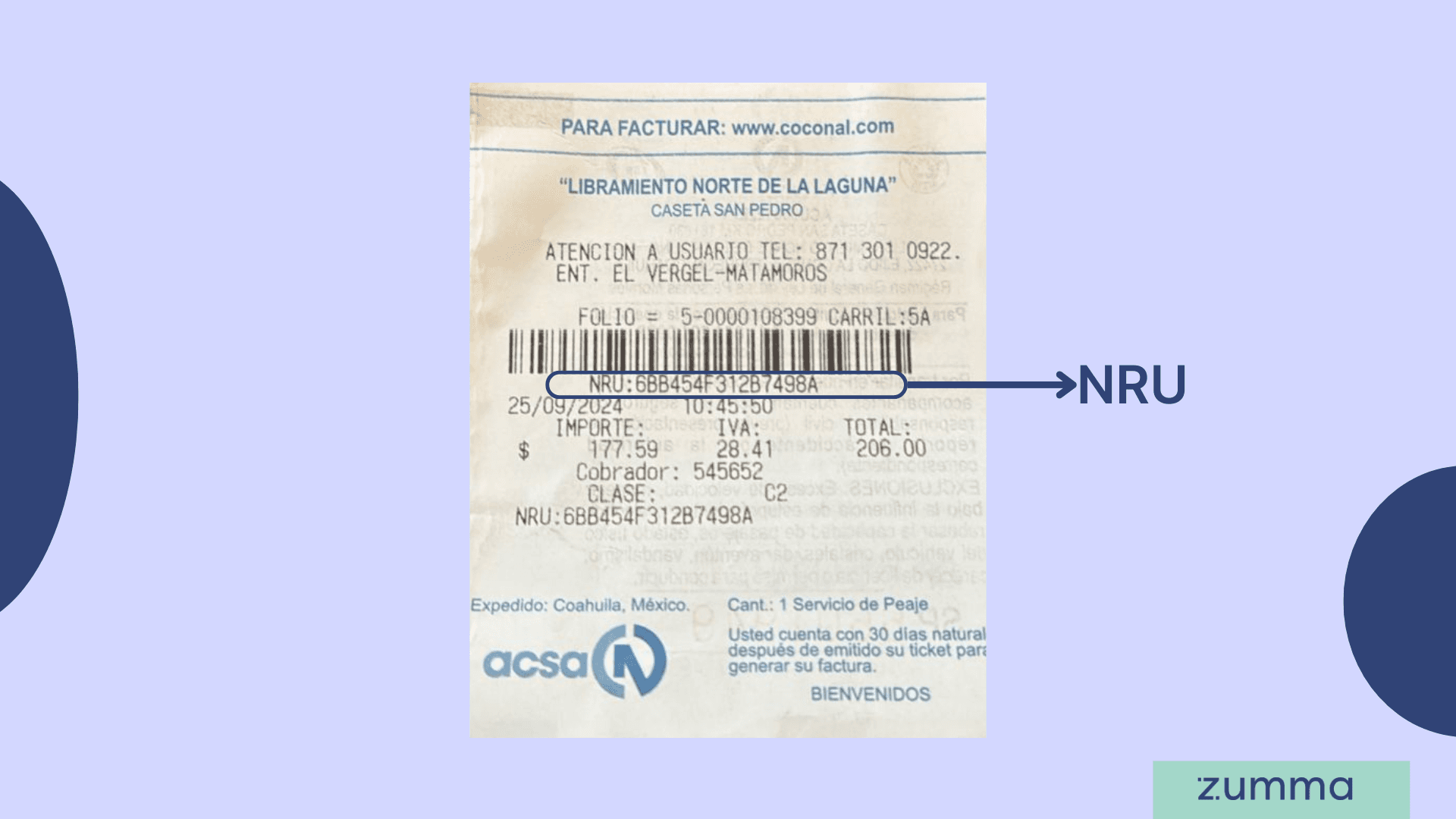
Step 3: Enter the NRU and payment method, then click "Agregar" (Add)
Step 4: Confirm your information and click "Realizar Factura" (Generate invoice)
And that's it! This is how you can get your invoice through the Autopistas Coconal invoicing portal.
Where to find the NRU on your toll receipt
The NRU is the code of letters and numbers that identifies your toll receipt. It is the data the Autopistas Coconal portal asks for to find your payment.
Look for it after the «NRU:» label.
It appears twice: right below the barcode and again at the bottom, after «Clase».
Don't confuse it with the folio, which is above the barcode, next to the lane number (carril).
Copy it without spaces.
Data the Autopistas Coconal invoicing portal asks for
You don't need to sign up to get your invoice. Have your receipt, your tax status certificate (Constancia de Situación Fiscal) and an email address at hand.
Field | Where to find it |
|---|---|
RFC | Tax status certificate |
Legal name (Razón social) | Tax status certificate |
Tax address: street, number, neighborhood, municipality, state, country and ZIP code | Tax status certificate |
Tax regime | Tax status certificate |
Receipt use (CFDI use) | Chosen from a list |
Payment method and form of payment | Chosen from a list |
NRU | Toll receipt, after «NRU:» |
Yours: the XML and PDF are sent there |
How long do you have to invoice an Autopistas Coconal receipt?
You have 30 calendar days from the date the receipt was issued. Both the invoicing portal and the toll receipt state it.
Common mistakes when invoicing Autopistas Coconal
Entering the folio instead of the NRU.
Combining receipts from different toll booths in one invoice: only receipts from the same toll booth can be invoiced together.
Letting more than 30 calendar days pass from the receipt date.
Looking for a TAG payment in this portal: that invoice comes from your electronic toll provider.
Entering the RFC with mistakes. The portal recommends checking it before you invoice.
Option 2: Invoice through Zumma Financial
If you're already a Zumma customer and have already entered your tax information in your account profile, just follow these steps:
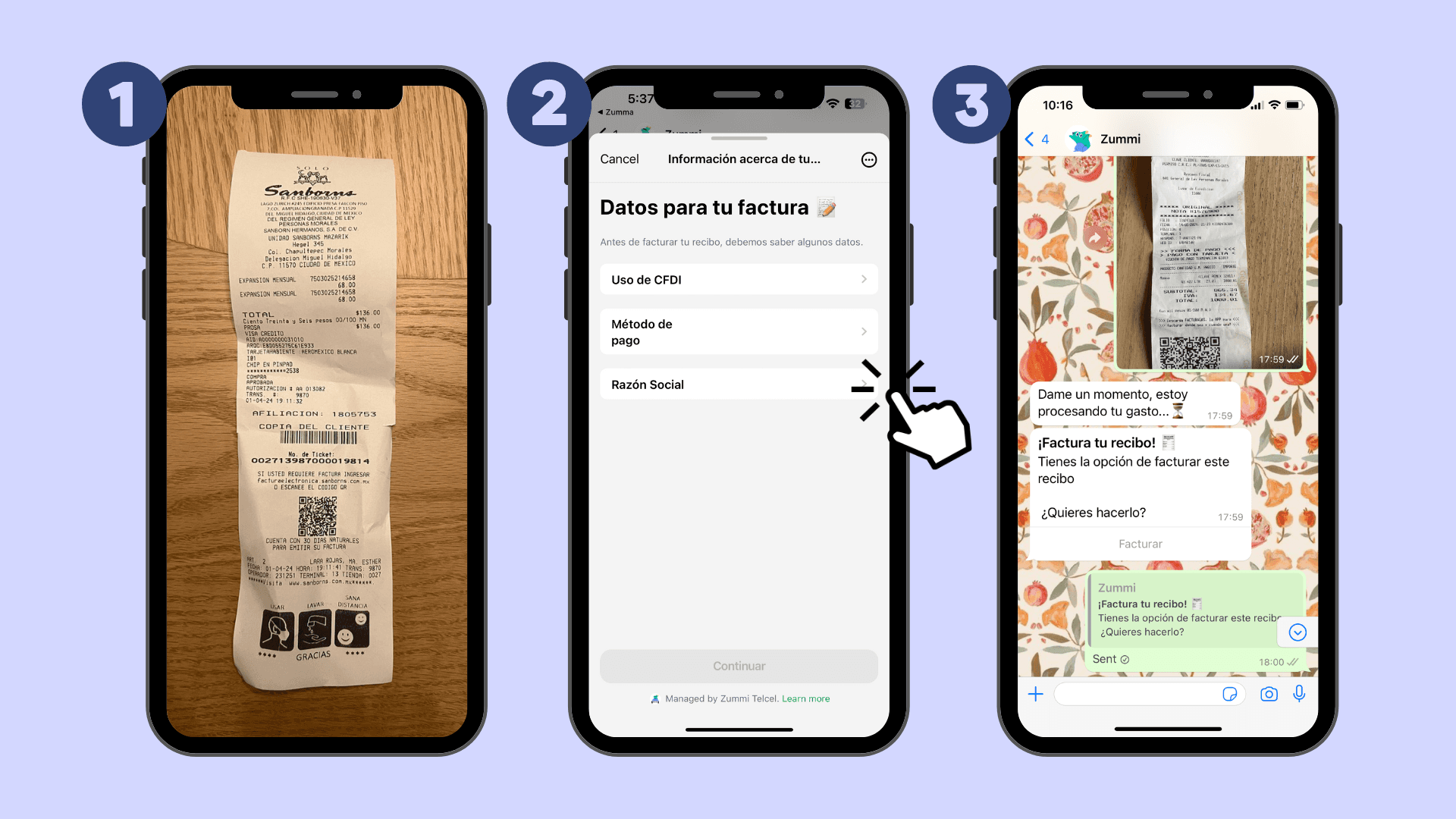
Step 1: Send a photo of your ticket via WhatsApp
Step 2: Choose the CFDI use and the payment method that should appear on your invoice
Step 3: Wait to receive your invoice via WhatsApp and email
If you're not yet a Zumma user and want to start automatically invoicing your expenses via WhatsApp, request a demo of our service here.
Start invoicing your expenses from WhatsApp
Frequently asked questions
What is the NRU for invoicing Autopistas Coconal tolls?
It is the code of letters and numbers after «NRU:» on your receipt, below the barcode. Enter it without spaces in the portal and click «Agregar».
Can I invoice several toll receipts in a single invoice?
Yes, as long as they are all from the same toll booth. Add each NRU with the «Agregar» button before generating the invoice.
How do I invoice an Autopistas Coconal toll if I paid with TAG?
If you paid with TAG, you don't request the invoice on this portal: you download it from your electronic toll provider's website.
More guides to invoice toll roads
Find more guides on invoicing company expenses in the Zumma blog.
ZUMMA FOR BUSINESS
Automate invoices on WhatsApp with Zumma.
Get your team's expense invoices from WhatsApp, without chasing receipts.
Start for free →