
How to invoice a McDonald's expense?
Step-by-step guide to invoice McDonald's expenses.
We give you two options to invoice expenses at McDonald's: the first is through the McDonald's website (estimated time: 8 minutes), and the second through Zumma Financial (estimated time: 2 minutes):
Option 1: McDonald's invoicing portal
Step 1: Go to the McDonald's invoicing portal
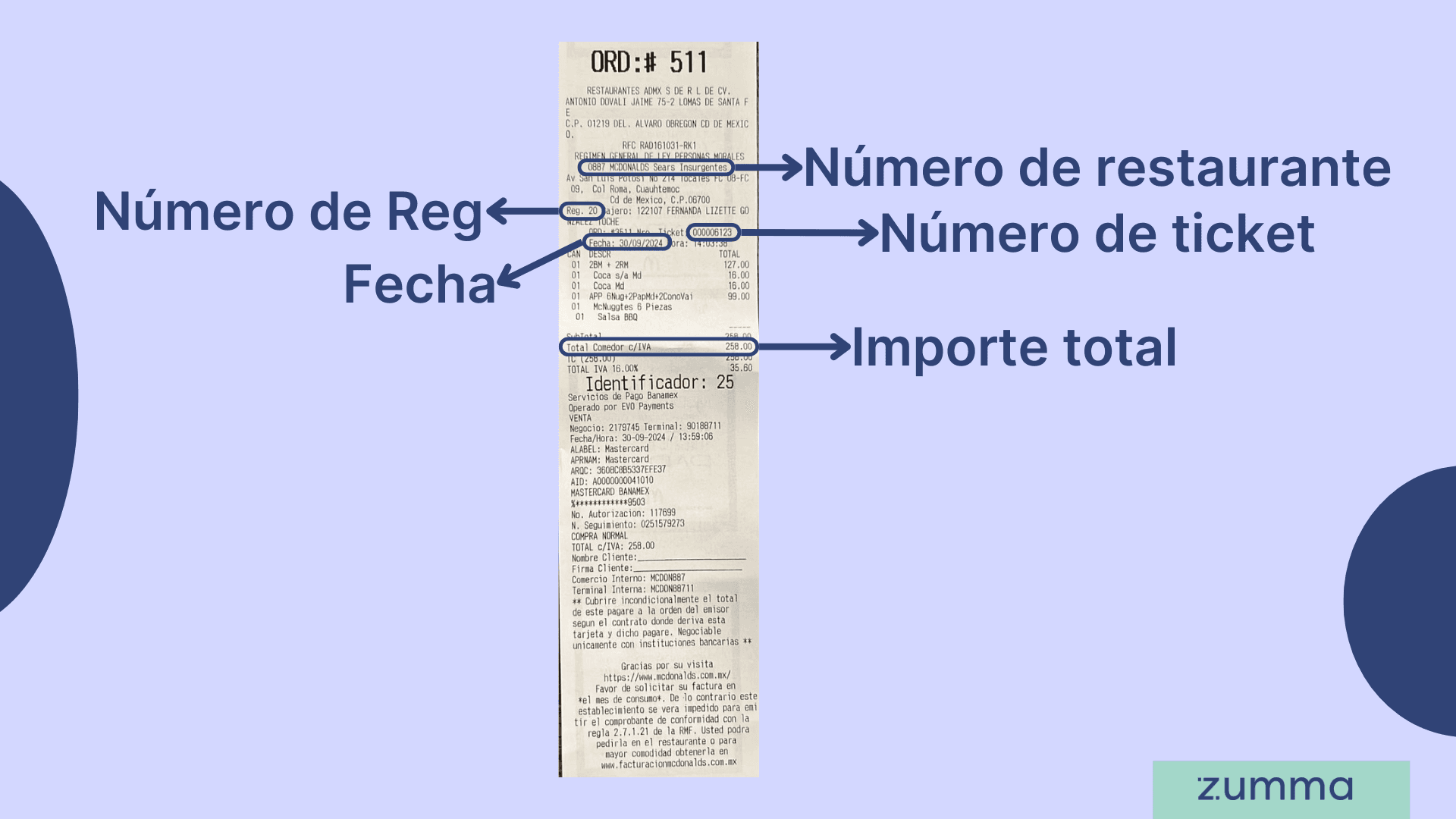
Step 2: Enter your ticket information: restaurant number, ticket number, Reg number, purchase date, and total ticket amount
Step 3: Enter the payment method
Step 4: Enter your tax information: RFC, business name, zip code, tax regime, CFDI use, and email address
Step 5: Verify your information, accept the privacy notice, and click "Realización de Facturación" (Generate Invoice)
And that's it! This is how you can get your invoice through the McDonald's invoicing portal.
Where to find the restaurant number and ticket number on your McDonald's receipt
All the receipt data the portal asks for is at the top of the receipt, before the list of items.
Restaurant number (Número de restaurante): the 4 digits below the RFC, right before «MCDONALDS» and the branch name. For example, 0807.
Ticket number (Número de ticket): on the line that starts with «ORD:», after «Nro. Ticket:».
Register number (Número Reg. o caja): at the start of the cashier line, after «Reg.». For example, 01.
Date (Fecha): below the ticket number, after «Fecha:».
Total amount (Importe total): the total with VAT (IVA) of your purchase, shown below the subtotal.
Data the McDonald's invoicing portal asks for
Have your receipt and your tax status certificate (Constancia de Situación Fiscal) at hand. Your tax data must match that certificate.
Field | Where to find it | How to enter it |
|---|---|---|
Restaurant number | Receipt | All 4 digits, as shown |
Ticket number | Receipt | Without leading zeros: 000027206 becomes 27206 |
Register number | Receipt | As shown, for example 01 |
Date | Receipt | The purchase date |
Total amount | Receipt | As shown |
Payment method | The one you used to pay | Chosen from a list |
RFC | Tax status certificate | Uppercase, no hyphens (12 or 13 characters) |
Legal name (Nombre o razón social) | Tax status certificate | Uppercase, without the corporate type (no «S.A. de C.V.») |
ZIP code | Tax status certificate | The one of your tax address |
Tax regime | Tax status certificate | Chosen from a list |
CFDI use | Chosen from a list | Chosen from a list |
Yours | The XML and PDF are sent there |
How long do you have to invoice a McDonald's receipt?
You have until the last day of the month in which you made the purchase. Both the portal and the receipt ask you to request the invoice in the month of consumption. If you request it later, the sale has already been included in the restaurant's invoice to the general public and the portal no longer accepts it.
Common mistakes when invoicing McDonald's
Entering the ticket number with its leading zeros.
Confusing the order number («ORD: #») with the ticket number.
Entering fewer than 4 digits in the restaurant number.
Adding «S.A. de C.V.» or another corporate type to the legal name.
Leaving the invoice for the following month.
Trying to invoice a receipt paid with a voucher (vale): the portal marks it as not billable.
Option 2: Invoice through Zumma Financial
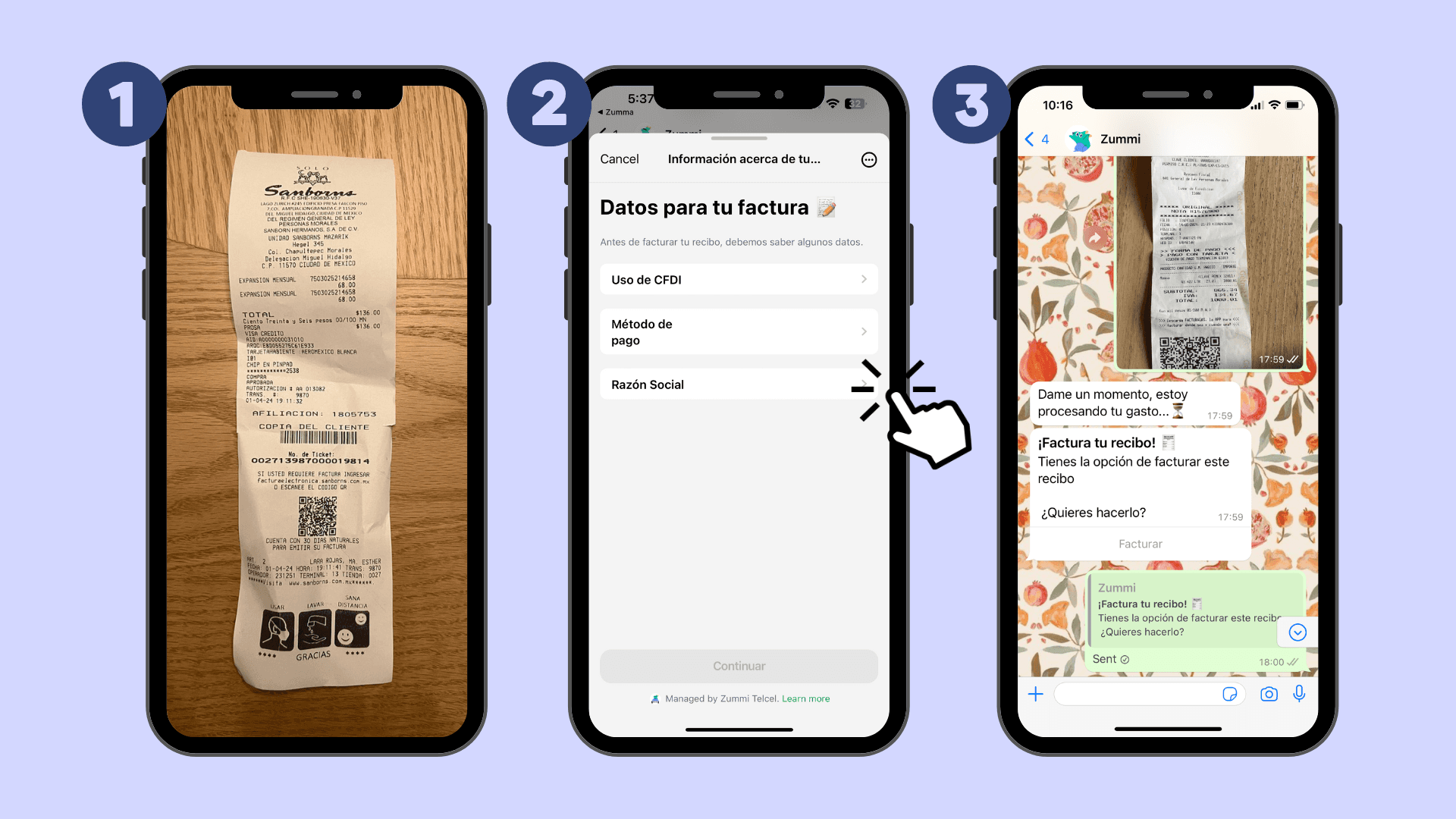
If you're already a Zumma customer and have already entered your tax information in your account profile, just follow these steps:
Step 1: Send a photo of your ticket via WhatsApp
Step 2: Choose the CFDI use and the payment method that should appear on your invoice
Step 3: Wait to receive your invoice via WhatsApp and email
If you're not yet a Zumma user and want to start automatically invoicing your expenses via WhatsApp, request a demo of our service here.
Start invoicing your expenses from WhatsApp
Frequently asked questions
What happens if I don't invoice my McDonald's receipt in the month of consumption?
The sale is included in the restaurant's invoice to the general public and the portal no longer accepts it. That is why it is best to invoice the same day or as soon as you have your tax data.
Where is the restaurant number on a McDonald's receipt?
It is the 4 digits below the RFC, before «MCDONALDS» and the branch name. Enter all 4 digits in the portal.
What should I do if the McDonald's portal can't find my receipt?
First check the receipt data, especially the ticket number without zeros and the register number. If it still doesn't show up, email facturacion@facturacionmcdonalds.com.mx with your tax status certificate in PDF, a clear photo of the receipt (one receipt per email), the payment method and the CFDI use.
To invoice receipts from other stores, see the guide how to invoice receipts in Mexico: data, portals and deadlines.
More guides to invoice restaurants and coffee shops
Find more guides on invoicing company expenses in the Zumma blog.
ZUMMA FOR BUSINESS
Automate invoices on WhatsApp with Zumma.
Get your team's expense invoices from WhatsApp, without chasing receipts.
Start for free →