¿Cómo facturar un gasto de Toks?
- Zumma Financial

- 21 oct 2024
- 1 min de lectura
Paso a paso para facturar gastos de Toks
Te damos dos opciones para facturar gastos en Toks, la primera es a través de la página de City Market (tiempo estimado 8 minutos) y la segunda a través de Zumma Financial (tiempo estimado 2 minutos):
Opción 1: Portal de facturación Toks
Paso 1: Ingresa al portal de facturación de Toks.
Paso 2: Da click en "Crear factura" e ingresa tu RFC, el número de ticket y el monto de tu ticket sin propina y da click en "Agregar ticket"
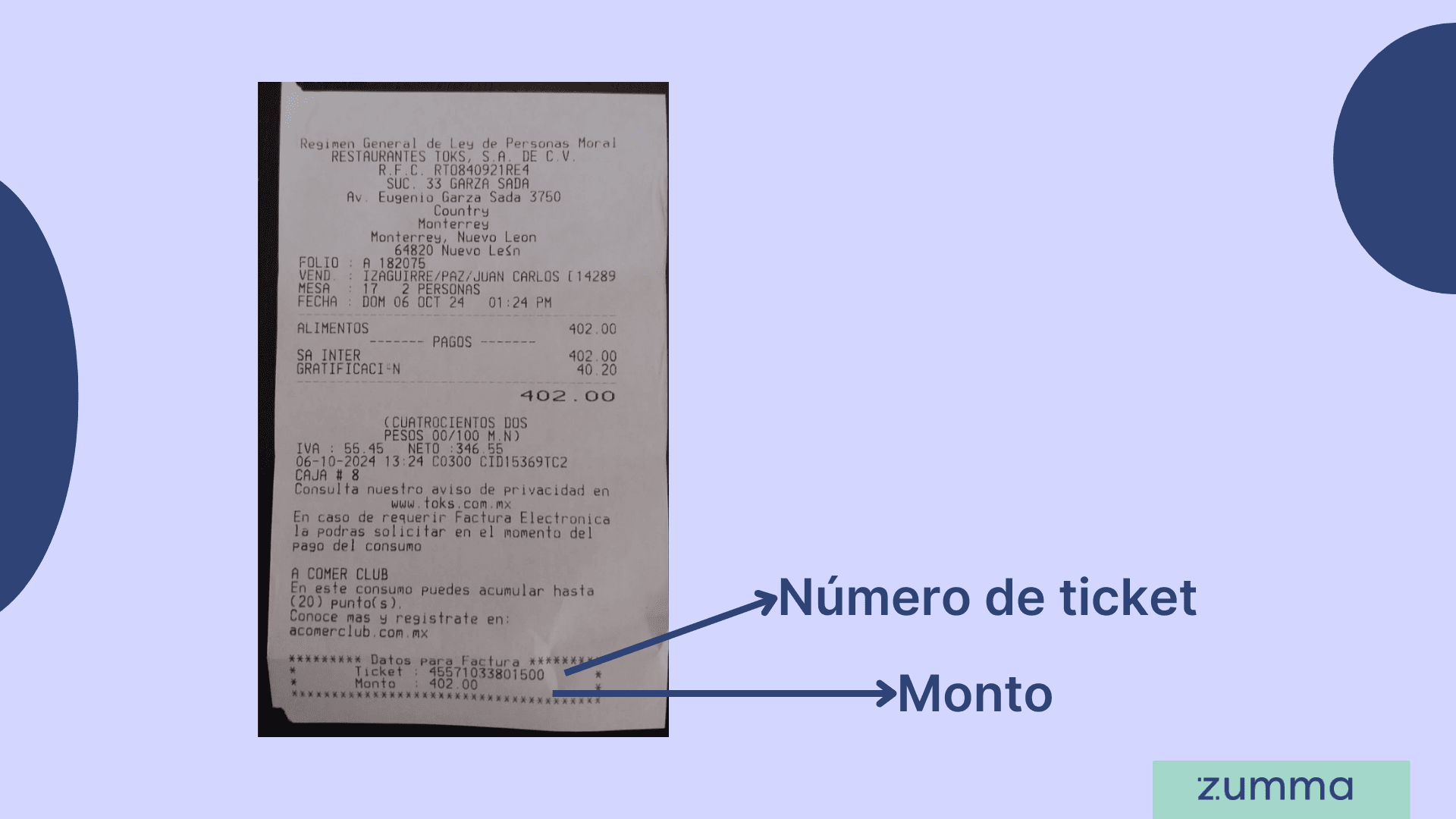
Paso 3: Confirma el monto a facturar y completa tu información fiscal.
Paso 4: Verifica que la información es correcta y da click en "Facturar". Podrás descargar tu factura en PDF, en XML y también podrás descargarla desde tu correo electrónico
¡Y listo! Así puedes obtener tu factura a través del portal de facturación de Toks
Opción 2: Facturar a través de Zumma Financial
Si ya eres cliente de Zumma y ya ingresaste tu información fiscal en tu perfil de tu cuenta. Solo tienes que seguir los siguientes pasos:
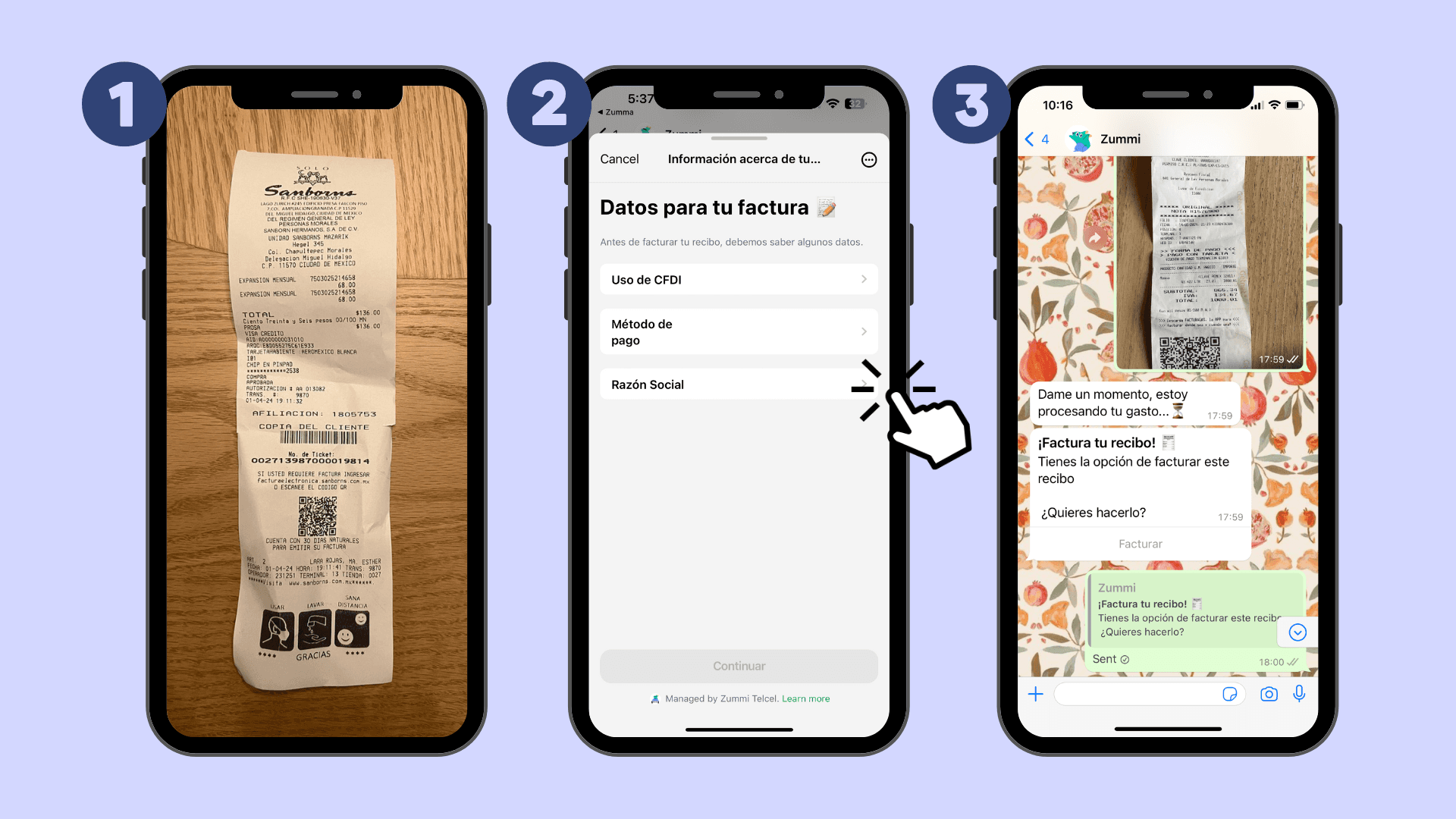
Paso 1: Envía la imagen de tu ticket a través de WhatsApp
Paso 2: Elige el Uso de CFDI y método de pago de tu compra
Paso 3: Espera a recibir tu factura por WhatsApp y por email
Si todavía no eres usuario de Zumma y quieres empezar a facturar tus gastos en automático por WhatsApp, solicita un demo de nuestro servicio aquí.


This piece provides a fresh and compelling take on the subject. I appreciate the depth of research and clarity in your writing. bear clicker sprunki mashup
https://soicauxsmb.com/ hôm trước thấy bạn bè nói nhiều quá nên mình cũng bấm vào nghía thử cho biết. Mình không đọc sâu đâu, chủ yếu lướt xem họ bố trí trang kiểu gì thôi. Ấn tượng đầu là nhìn khá dễ chịu, nền thoáng và các phần tách ra rõ ràng nên kéo xuống không bị rối mắt. Mình thích nhất là cách họ để số liệu theo dạng bảng/cột, nhìn nhanh là hiểu ý chính chứ không phải ngồi dò từng dòng. Với lại cái menu đặt chỗ dễ thấy nên đổi qua lại vài mục cơ bản cũng tiện, không phải bấm vòng vòng. Nói chung mới vào vài phút là quen tay, vì mấy khối thông tin…
Dạo gần đây mình khá thích đọc những bài giới thiệu nền tảng giải trí được viết ngắn gọn và dễ hiểu. Trong lúc lướt mạng, mình thấy khá nhiều người nhắc đến Luck8, đặc biệt ở các nội dung liên quan đến thể thao trực tuyến nên cũng tò mò vào xem thử. Mình chủ yếu quan sát cách họ sắp xếp giao diện và phân chia các mục nội dung. Cảm nhận ban đầu là bố cục khá gọn gàng, màu sắc dễ nhìn và mọi thứ được trình bày rất rõ ràng, tạo cảm giác thuận tiện khi đọc trên điện thoại.
I volunteer at a community center running afternoon activities for teens, and we recently added Spacebar clicker to our rotation of quick, screen-based games between programs. It's proven popular since there's no barrier to entry, kids walk up, try it for thirty seconds, and immediately understand how it works. We use a shared computer in the lounge, and it's held up fine with dozens of different users each week. What I like most from a supervision standpoint is the complete absence of inappropriate content or aggressive ads, which matters when we're responsible for what teens see on center devices. Sparked some informal tournaments among regulars too. Low-effort addition worth considering for similar youth programs.
Mỗi lần chuẩn bị về quê, việc đầu tiên mình làm là tìm dự báo thời tiết Hà Tĩnh để chủ động lịch trình. Website này hiển thị nhiệt độ hiện tại, cảm giác thực tế, độ ẩm và mây che phủ rất trực quan. Ngoài dự báo 7, 10, 15 đến 30 ngày, còn xem được thời tiết từng phường, xã cùng biểu đồ nhiệt độ, lượng mưa và nhiều bài viết hữu ích về thời tiết.